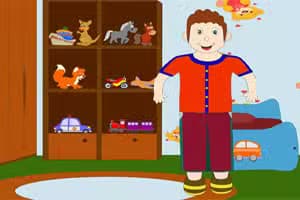

Make Your Little Kids is a creative dress-up game where you design and style unique young boy characters. This HTML5 browser game gives you full control over fashion and hairstyling, offering a wide selection of clothes, accessories, and hair options.
Using simple mouse clicks or touch controls, you can mix and match items to bring your character creations to life. It's a perfect casual game for anyone who enjoys character customization.
Similar to other avatar creators, this title provides a relaxing sandbox experience focused entirely on your imagination. There are no timers or scores, just pure creative freedom.
Getting started in Make Your Little Kids is incredibly simple. You begin with a default boy character that acts as your canvas. On the screen, you'll see various icons representing different customization categories, such as shirts, pants, shoes, hairstyles, and accessories.
Clicking or tapping on a category reveals all the available options within it.
To apply an item, just select it, and it will instantly appear on your character. This allows for quick experimentation, so you can see how different pieces look together.
You can swap items as many times as you like until you're happy with the final outfit. The user-friendly interface makes it easy for players of all ages to jump right in and start designing.
Make Your Little Kids features a diverse wardrobe to fuel your creativity. You'll find everything from casual t-shirts and hoodies to smart jackets and jeans.
The game also includes a variety of shorts, pants, and footwear like sneakers and boots to complete the lower half of the outfit. Many clothing items come with a color palette, letting you fine-tune the exact shade to match your vision.
Beyond the clothes, you can choose from dozens of different hairstyles, ranging from short and neat to long and spiky. Just like with the apparel, you can change the hair color to be a natural tone or something more wild.
To add the finishing touches, browse the accessories category for items like hats and glasses that give your character a unique personality.
You can enjoy Make Your Little Kids completely free in your web browser. As an HTML5 game, it requires no downloads, installations, or sign-ups.
This makes it easy to play on any device with an internet connection, including Chromebooks at school or PCs at work, since it's typically not blocked by network filters.
The goal in Make Your Little Kids is to use your fashion sense to design and dress up a young boy character. There are no rules or objectives, so you have complete creative freedom to style him however you like.
Controls are very straightforward. Use your mouse to left click on the different category icons (like shirts, hair, or pants). Then, click on the specific item you want to apply to the character. On a mobile device, you can just tap the icons.
Start by selecting a category to browse the available options. When you choose an item, it will automatically appear on the character. You can continue to mix and match items from all categories until you've created the perfect look.
You can also change the background scene to complement your final design.
Color Coordinate - Use the built-in color palettes on clothing and hair to create a cohesive and stylish look. Try matching a shirt color to the shoes.
Layer Your Outfits - For a more detailed style, combine items like a t-shirt with an open jacket or hoodie. This adds depth to your character's appearance.
Create a Theme - Challenge yourself by designing a character based on a theme, such as 'ready for school', 'skater boy', or 'formal event'. Accessories Last - Choose your main outfit first, then add accessories like glasses or hats.
This makes it easier to find pieces that complement the core look. Try Every Hairstyle - Don't stick to just one or two hairstyles. Experiment with different cuts and colors to completely change the character's personality.
Use the Background - Select a background that matches the vibe of your character's outfit to create a complete and polished final picture.
